SEO
May 4, 2023
If you've ever searched "dispensary near me" on Google (in? on? idk) - chances are you were served a few Google Business Profiles at the top of your results page....

By
Zach Santarsiero
Cofounder + COO
Updated June 2026
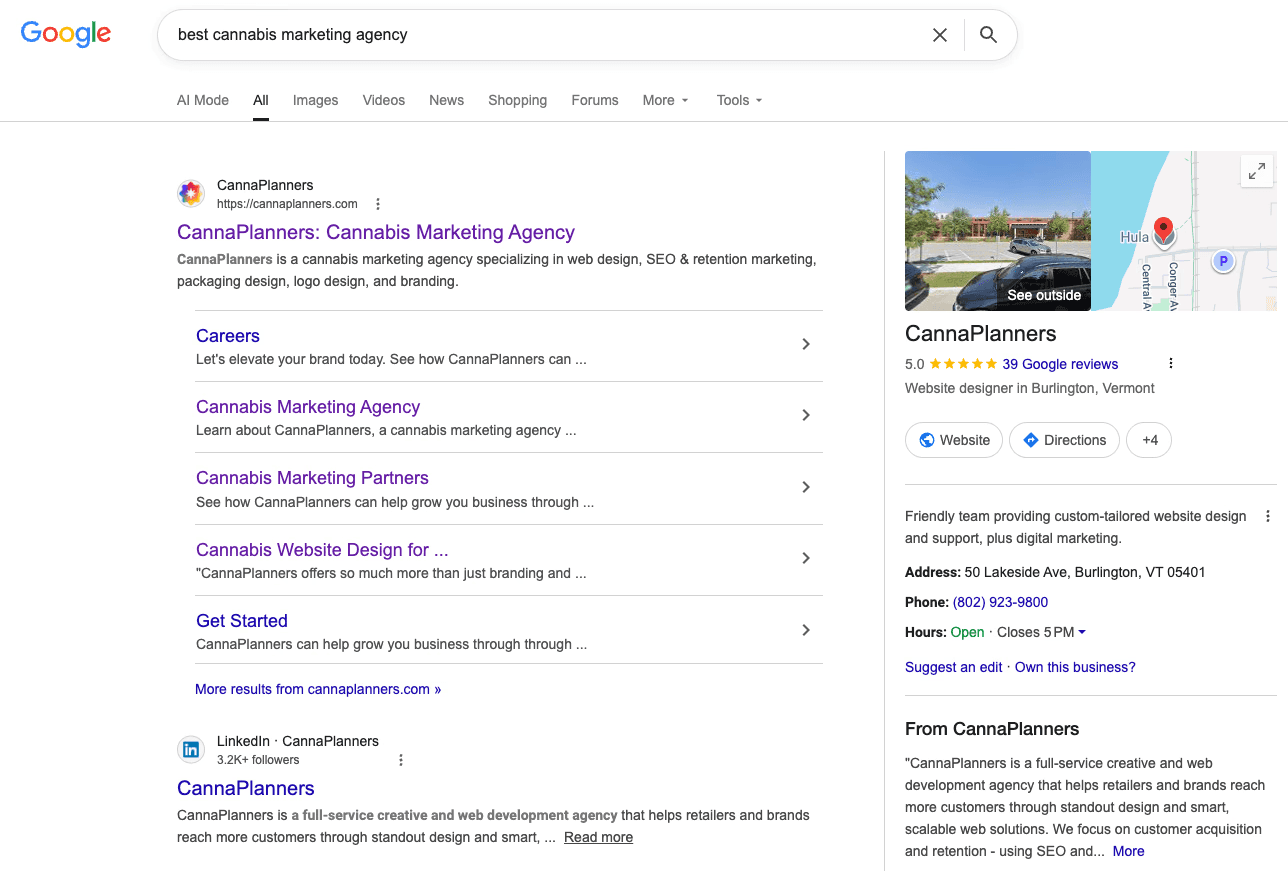
CannaPlanners Google Business Profile in the wild…
Ever typed “dispensary near me” into Google? If so, you’ve probably noticed those Google Business Profiles popping up right at the top of the results.
Google Business Profile (formerly Google My Business) is your most important digital asset for showing up on Google Search and Maps. These free listings are essential for local visibility and the only way to get your dispensary found directly on Google Maps.
Think of your Google Business Profile as your digital front door. It’s where people find your info, get directions, check out your website, and leave reviews. If someone searches “dispensary near me” in your area, your profile should be right there alongside your website. Don’t have one yet? Now’s the time to set it up.
Set up your profile and keep it fresh with up-to-date info. If you’re stuck or want to make sure you’re doing it right, reach out! We’ve helped plenty of dispensaries get their Google Business Profiles dialed in and are always happy to share tips or answer your questions.
Create a profile for your dispensary and keep it updated with accurate, relevant info. Contact us if you need help setting up or improving your profile. We’ve helped many dispensaries create and optimize their Google Business Profiles and are happy to discuss best practices or answer questions.
A quick note on Google Business Profile, AI search, and local visibility
Your Google Business Profile isn’t just a digital phone book anymore. It helps Google recognize your dispensary as a legit local business across Search, Maps, branded results, and even AI-powered search.
Make sure your profile, website, menu, reviews, and any local content all tell the same story. The more consistent your info, the easier it is for Google to match your dispensary with local shoppers looking for what you offer.
Ready to boost your local visibility? Here are 8 tips to help your Google Business Profile stand out:
1. Use a Search-Friendly Name
According to Google’s Guidelines, it’s prohibited to include keywords in your Google Business Profile name that are not part of your actual business name.
If you have “dispensary,” “cannabis,” “weed,” or another search-friendly keyword in your real business name, it can help in local Google Maps and organic search results. Some businesses register a DBA that includes these keywords so they can use them properly in their profile name.
This can work if you do it right, but watch out: Google is quick to suspend profiles for keyword stuffing (adding keywords that aren’t part of your real business name). Play it safe.
Stick with your real business name. Use your website, business description, categories, reviews, and local SEO to give Google all the extra context it needs.
2. Select the Appropriate Business Category
After entering your business name and indicating whether you have a storefront or an online business, you will be asked to select a business category.
For most licensed cannabis dispensaries, “Cannabis store” is often the most relevant category when available. Some dispensaries may also consider secondary categories such as “alternative medicine practitioner” or “herb shop,” depending on their business model, licensing, and local market.
Think about what makes sense for your customers and check out what your competitors are doing. Always represent your business accurately and stick to Google’s Guidelines to avoid getting your profile suspended.
Your category is there to describe your business, not to sneak in extra keywords.
3. Provide and Double-Check Address and Contact Details
Enter your business address exactly as it appears in real life. Add your main phone number and link to your main website.
Adding your website isn’t required, but it’s a smart move. It makes things easier for customers and sends more traffic your way when people find you on the map. You can even add an “order URL” that links straight to your pre-order menu.
Double-check that your business name, address, phone number, hours, website, and menu links match everywhere—your Google Business Profile, website, menu platform, social media, and any other local listings.
Pro tip: Add UTM codes to your Google Business URLs so you can track this traffic separately from your other organic visitors. That way, you’ll know exactly how many people are landing on your site, menu, or order page from your profile.
Here’s a UTM Code Builder we often use.
4. Create a Keyword-Rich Business Description That Matches Your Brand Voice
Write a business description that includes your business name and a few search-friendly keywords like “recreational marijuana dispensary,” “medical marijuana dispensary,” or “cannabis dispensary” - whatever fits your shop best.
This is also a great spot to talk about your store vibe and the types of products you carry, since you can’t list every item or service like other retailers.
Keep it real, helpful, and compliant. Skip medical claims, big promises, pricing, discounts, or anything that makes your profile sound like a sales pitch.
Your goal? Make it easy for customers to know who you are, where to find you, and what kind of experience they’ll get when they walk in.
5. Don’t Skip Hours of Operation
Don’t forget to add your full hours of operation. Lots of people check this before deciding where to shop. If your hours are missing or out of date, you risk losing customers to the shop down the street.
Things happen. Holidays, weather, events, staffing changes. Make sure your Google Business Profile and website always show the same hours, and update special hours as needed.
6. Evaluate the Map Pin Google Assigns for Your Address
Google drops a pin on Maps to show your location, but sometimes it’s a little off. That can confuse customers trying to find you.
You can drag the pin to the right spot if it’s not accurate.
This matters even more if you’re in a plaza, shared building, big retail center, or anywhere with multiple entrances. If parking or the entrance is tricky, use photos and clear directions on your website to help first-timers.
7. Include Photos
Photos let people peek inside your dispensary before they visit. Always upload a few, especially a clear shot of your storefront.
Good photo options may include:
Storefront
Exterior signage
Entrance
Parking area
Lobby or check-in area
Sales floor, if allowed
Pickup area
Accessibility features
Team photos, if approved (don't forget the photo release form!)
There are some rules about what you can show. Keep your photos helpful and safe. Skip anything with cannabis consumption, open products, medical claims, pricing, discounts, or anything that could get flagged by Google.
The best photos answer real customer questions like:
Where do I park?
What does the entrance look like?
Is this the right place?
What should I expect when I walk in?
8. Make a Plan for Getting Google Reviews
Your Google Business Profile is where customers can leave public reviews. The more positive reviews you rack up, the more organic traffic and good vibes you’ll get.
Have a plan for asking customers to leave Google reviews. Sometimes all it takes is a friendly reminder as they leave. You can even print a QR code that links directly to your review page, so customers can scan it and leave feedback right at checkout.
Here’s a QR code generator we often use.
Do not offer discounts, gifts, loyalty points, or perks for reviews. Review requests should be simple, honest, and consistent.
When responding to reviews, keep replies professional and privacy-conscious. Do not confirm what someone purchased, how they use cannabis, or any medical details. A simple response like “Thank you for visiting us. We appreciate the feedback and hope to see you again soon” is safer than being too specific.
Reviews aren’t just for show; they can boost your dispensary's online visibility. If you notice customers asking the same questions or mentioning certain details, use those insights to update your website FAQs, local landing pages, or content strategy.
Sync Up Your Website and Google Business Profile
Your Google Business Profile and website should work together as a team to support your local SEO.
Make sure your website includes the same:
Business name
Address
Phone number
Hours
Menu or order link
Location details
Directions or parking notes
If your profile says one thing and your website says another, you’ll confuse both your customers and Google.
Your location page should back up your Google Business Profile with clear local info, shopping options, menu links, FAQs, and up-to-date contact details. If you use local business schema on your site, that’s a bonus for helping search engines get the full picture.
Get Your Dispensary Established Online with Our Help
Need help getting your dispensary noticed online? CannaPlanners can help with everything from website development and retention marketing to branding and local SEO strategy.